How To Use Your ISO Insurance ID Card
.png)
ISO Customer Care | Sep 30, 2026 Insurance
If you’re a member with ISO, you should have received an insurance ID card via email when you first completed your enrollment. Many of you may understand that your insurance card is important but may not fully understand why or have questions about the information listed on it.
One of the most essential things that we suggest you do as our member is review your insurance ID card and keep it some place where you can easily access it. The information on this card is essential when it comes to making an appointment with a provider and ensuring claims are submitted. It may not seem like a big deal, but absolutely can be in an emergency situation.
With this in mind, we want to use this article to get you better acquainted with the information listed on your insurance ID card and give you a better idea with what you should do if you need to reference it in the future.
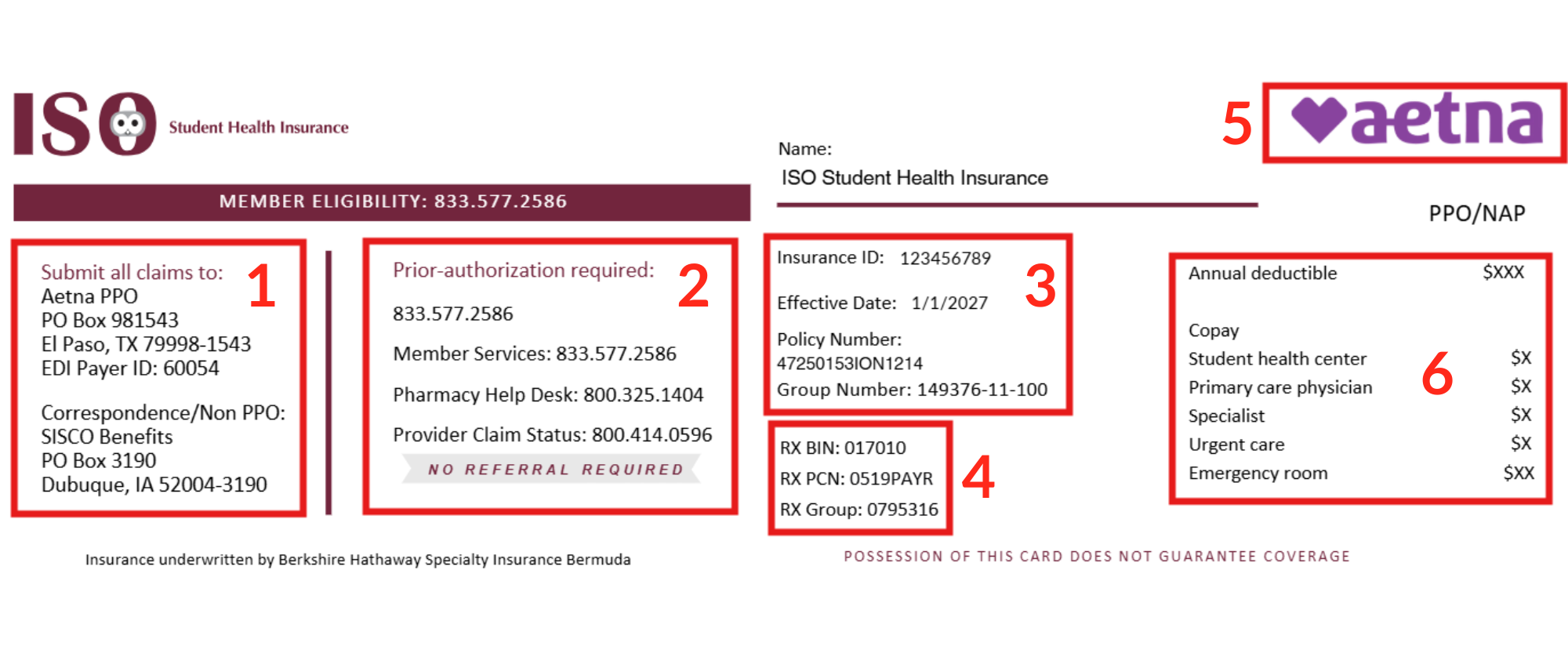
An Overview of Your Card
Above is a sample card, with a few highlighted sections identified by number. You can see there is quite a bit of information listed, which is there for both you and any provider you may see in the future.
You can review the key below for an overview of what each section contains.
Key for highlighted areas:
Section #1 – Claims department contact information. Here, the provider can find the address they can send claims to, as well the payer ID number and claims phone number. You can also visit the “Claims Process” section on our website to check up on the status for your pending or settled claims.
Section #2 – Some phone numbers to provider further assistance, including:
- Member services are also SISCO (the claim department’s) phone number: You can also call this number to get claim status updates.
- Pharmacy help desk phone number: If a pharmacy has issues pulling up your information or determining a discount amount, they can call this number.
- Provider claim status is for medical providers to call and check on your claims status.
Section #3 – General insurance plan information. Also available on your confirmation letter.
Section #4 – Your plan’s RX numbers. Pharmacies can use this information to apply a discount to a prescription fill (if eligible).
Section #5 – Your plan’s provider network. Here, you’ll see Aetna listed. You can use this information to locate in network providers or verify directly if a provider is in network.
Section #6 – Includes your plan’s copay and deductible amounts. Providers will use this information and may ask you to pay for one of these amounts of pocket at the time of visit.
In addition to the card, the PDF of your insurance ID card contains more information on the top half of the page, above the insurance ID card information. You can reference this section to get more information on how to find providers, how to file a claim, and check claims status.
How do I use my card when seeing a provider?
When making an appointment with a provider, they will generally first ask you to submit insurance information. You will probably be asked to give them your insurance ID card information and/or fill out a corresponding form.
Once you give them your card, they’ll generally save it and then you should be free to go to your appointment. However, there are a few things you can speak with the provider about to ensure a smoother process:
- As shown above, your ID card shows the Aetna PPO network that your plan works with. When you give the provider your card, you can note to them that your plan simply works with this network and that claims will be sent to them at the address in Section #1.
- The provider should avoid inputting your insurance information into their system, as ISO does not report your information to any database they can access. If the provider wants to verify active coverage, they can contact ISO directly at 212-262-8922.
- Similarly, if you go to a pharmacy, tell them to only input the RX numbers on your card in their system. If they input additional information, it may cause the plan to show as inactive or with inaccurate information. They can input the RX numbers and charge you the discounted rate. From there, you can submit a claim for reimbursement, following the steps on this page.
After your visit, the provider can use the address listed on your card to submit a claim on your behalf. For more on the claims process, you can read our article on the subject.
Note that most providers will allow you to email your insurance ID card, so it is not necessary to have a physical copy of it. ISO does not provide physical ID Cards via mail so if you would like one for your own preference, you can print out the digital copy and put it somewhere safe.